Text
We start with the h1 to h6, after it the
<p>for paragraphs
then comes
                                  <em>for emphasis and not just the italic look

                                  <strong>for the importance and not the bold look

                                  <i>for the italic look only

                                  <b>for the bold look only

                                  <code>for writing the code, it only adds the symanthic meaning, the style needs to be added in css

                                  <blockquote>this is for quotes, it adds the line break and white space >

                                  <q>for inline quote

                                  <pre>preserves the spaces and the writing style from the code

                                  <br>is a line breaker moves the text to the next line.

                                  <!--  -->this is used to leave a comment in the html code
List
Unordered
- this is an unordered list
- this is a list item
- check the code so you know how shit works
Ordered
- this is an ordered list
- this is a list item
- check the code so you know how shit works
Description
- this is a detailed list
- it contains a term and its description
- this is a term
- this is its description
- open the code
- so you know how this works
attributes
- class
- used to give the element a class that can be targeted by CSS or JS
- id
- used to give the element a unique id, only one element can have that id
- href
- is used in the <a>link</a> tag. it adds the directory to the text inside the tags
- disabled
- this is a boolean attribute, its presence alone means that the value is true. this one is used in forms
links
The element is used to add links to the web page, through adding URLs in the href attribute. the url can be relative or absolute.
Absolute: means that where ever you are in the web page the link will point u always to that location, mostly used to link to another website.
example:
https://example.com/about/
Relative: means that its relative to the path and directory the current web page/file is in.baiscally like navigating a folder and point to the exact folder or file
example:
- href="../"
- href="photos/"
we can also point to a section in the web page using ID of that section for example:
href="about.html#team"
this is pointing tto the section with the ID "team".
we can also use the "mailto:" and "tel:" inside the href to direct to a male or a phone number, like the following example:
href="mailto:hello@example.com" Email us
href="tel:+4532123456" Call +45 32 12 34 56
useful attributes
- target="_blank"
- we use this attribute to open the link in a new page
- rel="noopener"
- this prevents the new page from getting access to the page that opened it in older browsers, modern browsers apply it by default
- download
- this is attribute, it tells the browser to download the file instead of navigating to it. you can assign a string value to it, the browser will use that string as the default filename for the downloaded file
page structure
we use semantic container elements for the major regions of the web page
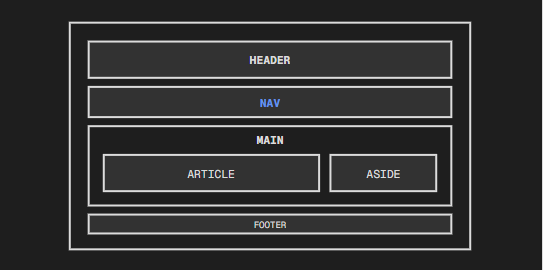
- header
- contains introductory content. mainly a navigation bar (nav) and other links, there can be headers inside articles and sections
- nav
- contains a major group of navigation links
- main
- contains the main content of the page
- footer
- contains closing information for its nearest section or for the page as a whole
- article
- we use article for self-contained pieces that would make sense on their own
- section
- is used for thematic grouping inside a document, it always needs a heading otherwise a div would do
- aside
- this is used for content that relates to what's nearby but not the main focus
- div
- is a block level element. use it when no other semantic element is applicable
- span
- is an inline level element. use ot around small pieces of phrasing content inside a paragraph or heading